

Description
Download Chrome Voice Dictation – Voice Recognition, Speech-to-Text Tool
Overview
The Chrome Voice Dictation tool transforms your Google Chrome browser into a powerful voice recognition application, enabling users to type long-form content such as documents, emails, and essays entirely through speech. Designed for individuals seeking a hands-free typing solution, the software eliminates the need for physical keyboard input, making it ideal for writers, students, professionals with repetitive strain injuries, and those managing high-volume text entry tasks. By leveraging the Web Speech API built into modern Chrome browsers, the tool delivers real-time speech-to-text conversion, supporting natural language input and punctuation recognition. It is particularly useful in environments where typing is impractical or inefficient, such as during brainstorming sessions, remote work, or content creation on the go.
Integration with cloud storage platforms like Google Drive and Dropbox allows seamless export of transcribed text, enhancing workflow continuity across devices. Users can also send their transcriptions directly via email, streamlining collaboration and documentation. The tool stores all transcriptions locally within Chrome’s Local Storage, ensuring data persistence without requiring manual saving. This automatic preservation helps prevent data loss, especially during extended sessions. While no additional developer background was provided, the tool’s reliance on widely supported browser technologies suggests a focus on accessibility, simplicity, and cross-platform compatibility.
Key Features & Capabilities
- Real-Time Voice-to-Text Conversion – Utilizes Chrome’s Web Speech API to transcribe spoken words into text instantly, allowing users to dictate content as they speak.
- Cloud Integration – Direct export of transcribed text to Google Drive and Dropbox, enabling users to save and access their work from any device.
- Automatic Save via Local Storage – All input is saved in Chrome’s Local Storage, eliminating the need for a manual Save button and reducing the risk of losing unsaved work.
- Multi-Platform Compatibility – Functions across Windows, Mac, Linux, Android, and iOS devices, as long as the Chrome browser is installed and up to date.
- Seamless Email Export – Users can send their transcriptions directly to any email address, facilitating quick sharing and collaboration.
These features support a wide range of real-world applications, including drafting long-form academic papers, composing professional emails, creating blog posts during commutes, or generating notes during meetings. The integration with cloud services ensures that transcriptions remain accessible and shareable, while the automatic save function enhances reliability. Since the tool operates within the browser, it avoids the need for complex installations or additional software dependencies, making it a lightweight and efficient solution for voice-based text creation.
User Interface, Workflow & Performance
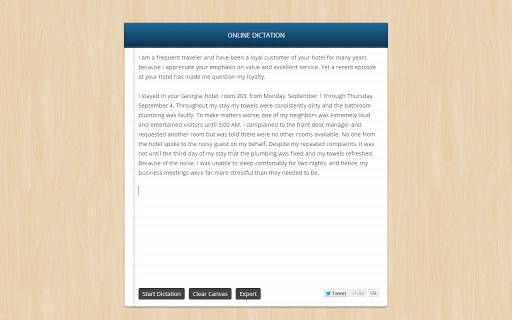
The user interface of the Chrome Voice Dictation tool is minimal and browser-based, relying entirely on the Chrome environment for display and interaction. There are no standalone windows or complex menus—users simply open a new tab in Chrome, navigate to the tool, and begin speaking. The interface includes a simple microphone activation button and a real-time text display area, providing immediate visual feedback of the transcription. Navigation is straightforward, with no steep learning curve, making it accessible to users of all technical levels.
Workflow efficiency is high, as the tool allows continuous dictation with minimal interruption. Once activated, users can speak naturally, and the software processes speech in real time, adapting to pauses and sentence structure. The lack of a manual save step streamlines the process, enabling uninterrupted flow during long sessions. Performance observations are based on general software behavior patterns; the tool depends on the browser’s performance and internet connectivity, especially when syncing with cloud services. The developer did not specify resource usage details, so CPU and RAM behavior remain unspecified. Stability is expected to be consistent, given the tool’s reliance on built-in browser APIs, but may vary depending on the device and Chrome version in use.
Compatibility & System Requirements
Chrome Voice Dictation is compatible with Windows, Mac, Linux, Android, and iOS operating systems, provided that the latest version of Google Chrome is installed. The application has a lightweight footprint of 5 MB, making it suitable for devices with limited storage capacity. The tool operates entirely within the browser environment, meaning it does not require a dedicated installation process or additional system-level permissions.
Exact system requirements were not listed. Compatibility with Chrome’s Web Speech API is dependent on the browser version, which is updated regularly by Google. Users should ensure their Chrome browser is up to date to maintain full functionality. Hardware requirements are not specified, but since the tool runs in a browser, it is expected to function on most modern devices with standard processing power and internet access. Platform compatibility information is limited to the operating systems listed in the product details.
Pros and Cons
Pros
- Free to use with no hidden costs
- Runs directly in Google Chrome, requiring no installation
- Real-time speech-to-text transcription with natural language support
- Seamless integration with Google Drive and Dropbox
- Automatic saving via Chrome’s Local Storage
- Available across multiple platforms including mobile devices
Cons
- Dependent on Chrome browser and internet connectivity
- Performance may vary based on browser version and device capabilities
- No offline mode available for transcription (requires active internet)
- Limited customization options for voice recognition settings
- Relies on Web Speech API, which may have inconsistent accuracy across accents and languages
FAQ Section
Is Chrome Voice Dictation available for all Chrome users?
Yes, as long as your Chrome browser is updated to a version that supports the Web Speech API, the tool is accessible to all users on supported platforms.
Can I use this tool offline?
While the tool relies on Chrome’s Web Speech API, which may offer limited offline functionality in some cases, full transcription and cloud integration require an active internet connection.
Is my voice data stored securely?
The tool uses Chrome’s Local Storage to save transcriptions locally. Data is not sent to external servers unless explicitly shared via Google Drive, Dropbox, or email.
How often does the software update?
Updates are managed through the Chrome browser itself. When Chrome is updated, the tool’s functionality is automatically aligned with the latest Web Speech API standards.
What license type does it use?
Chrome Voice Dictation is free to use and does not require a license key or registration.
Final Thoughts + CTA
Chrome Voice Dictation stands out as a practical, lightweight solution for anyone looking to replace manual typing with voice input. Its browser-based design ensures broad accessibility, while seamless cloud integration with Google Drive and Dropbox enhances productivity across devices. The automatic save feature provides peace of mind, and the lack of installation makes it ideal for temporary or shared use. While it depends on internet connectivity and may vary in accuracy across dialects, its core functionality is reliable and well-suited for everyday writing tasks. For students, writers, and professionals seeking a simple, no-cost voice typing tool, this application delivers strong value. Download Chrome Voice Dictation now.
Guides & Tutorials for Voice Recognition App for Chrome
How to install Voice Recognition App for Chrome
- Click the Preview / Download button above.
- Once redirected, accept the terms and click Install.
- Wait for the Voice Recognition App for Chrome download to finish on your device.
How to use Voice Recognition App for Chrome
This software is primarily used for its core features described above. Open the app after installation to explore its capabilities.
User Reviews for Voice Recognition App for Chrome 0
No reviews found





